
Automated S3 Backup & Restore with Shell Script
How to Set Up a Secure and Efficient Backup with AWS S3 and Shell Scripting
Hey! I’m Vishal Gurjar, a passionate DevOps Engineer skilled in automation, CI/CD, and cloud-native applications. 💡 Skilled in Docker, Kubernetes, Jenkins, AWS, GitHub Actions, and Linux. 🔨 Built real-world DevOps projects like Robot Shop & Netflix Clone with scalable pipelines. 📚 Documenting my journey through blogs/tutorials to help others learn faster. 🤝 Open to collaborations, freelancing, and exciting DevOps opportunities.
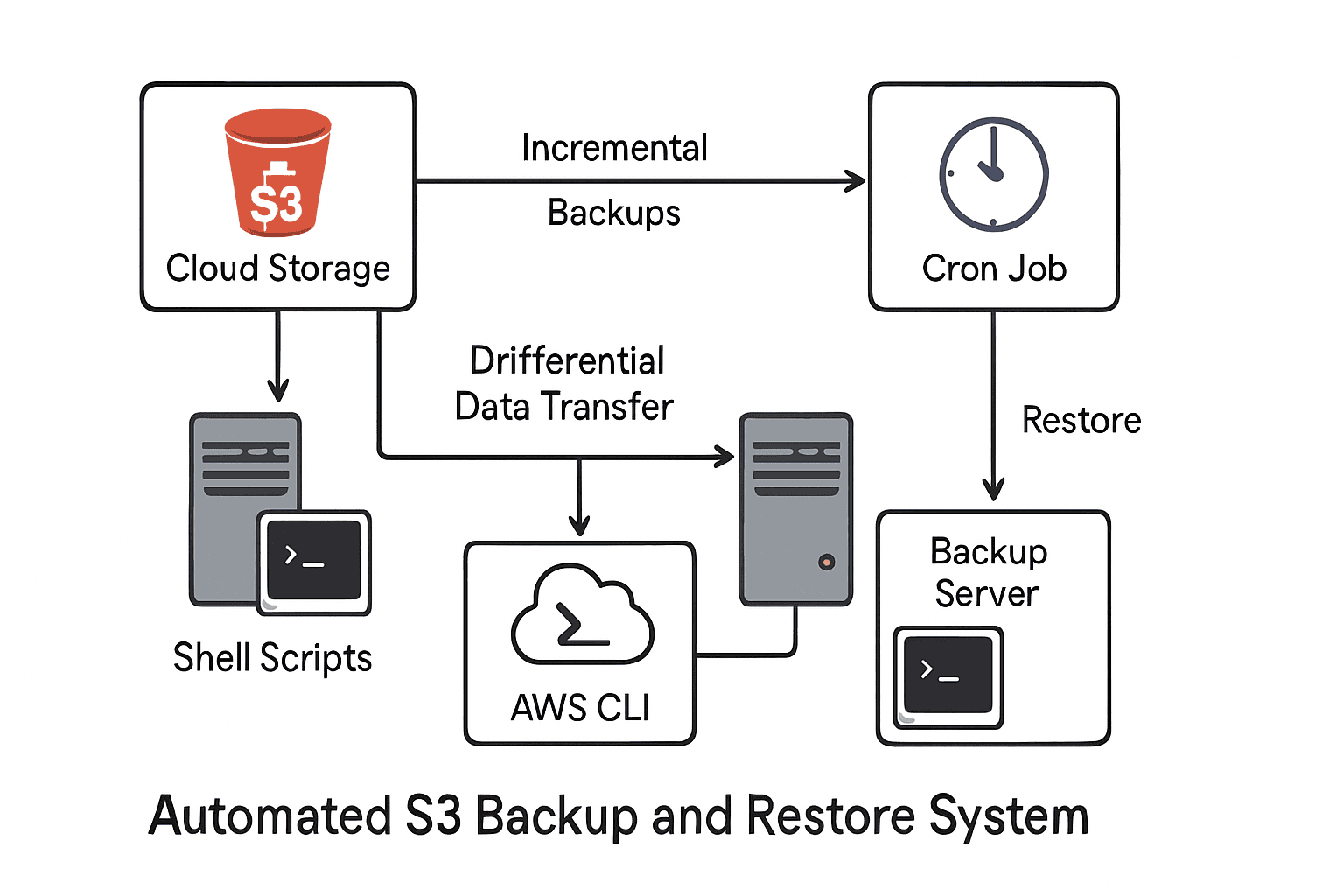
In this project, I built a secure and automated backup & restore system using AWS S3 and shell scripting. The aim was to back up a local directory and a database to Amazon S3, ensure incremental backups, enable automation, maintain logs, and even support encryption as a bonus.
Prerequisites
AWS Account with S3 bucket
AWS CLI installed & configured
Ubuntu/Linux environment
Basic shell scripting knowledge
cronjob(for real-time backup)
Project Requirements (as per assignment PDF)
Backup a local directory to S3
Incremental backups
Automate backups (scheduled or real-time)
Logging
Restore process
Database backup
Optional encryption before upload
Launch an Instance:

Setting up AWS CLI
sudo apt update
sudo apt install unzip -y
curl "https://awscli.amazonaws.com/awscli-exe-linux-x86_64.zip" -o "awscliv2.zip"
unzip awscliv2.zip
sudo ./aws/install
aws configure


Creating S3 Bucket

Setting up the Environment
I started by creating a folder called mybackup where all the files to be backed up would be stored:
mkdir mybackup
echo "task1" > vishal.txt
echo "task2" > vishal1.txt
touch vishal2
For testing, I created a couple of files:

Creating the Backup Script
I wrote a shell script named backup-to-s3.sh to upload the contents of mybackup to my S3 bucket.
#!/bin/bash

FOLDER_PATH="/home/ubuntu/mybackup"
BUCKET_NAME="my-backup-bucket-vishal"
LOG_FILE="/home/ubuntu/backup-log.txt"
DATE=$(date +"%Y-%m-%d %H:%M:%S")

echo "[$DATE] Backup started..." | tee -a "$LOG_FILE"

aws s3 sync "$FOLDER_PATH" "s3://$BUCKET_NAME/" \
    --exact-timestamps \
    --storage-class STANDARD_IA \
    >> "$LOG_FILE" 2>&1

I made it executable:
chmod +x /home/ubuntu/backup-to-s3.sh

Automating the Backup
Manual execution wasn’t enough. I needed automation.
I used cron to schedule the backup every 2 minutes:
crontab -e
Added the line: (for testing)
*/1 * * * /home/ubuntu/backup-to-s3.sh
Now, the script runs automatically every 1 minutes and backs up any new or modified files.


Restore Script
I also wrote a restore script to pull files from S3 back to my local folder:
#!/bin/bash

RESTORE_PATH="/home/ubuntu/mybackup"
BUCKET_NAME="my-backup-bucket-vishal"
LOG_FILE="/home/ubuntu/restore-log.txt"
DATE=$(date +"%Y-%m-%d %H:%M:%S")

echo "[$DATE] Restore started..." | tee -a "$LOG_FILE"

aws s3 sync "s3://$BUCKET_NAME/" "$RESTORE_PATH" \
    --exact-timestamps \
    >> "$LOG_FILE" 2>&1


The files vg.py, vishal.txt, and vishal2 in the mybackup directory are deleted, and then they are restored from the my-backup-bucket-vishal S3 bucket back into the mybackup directory.

Results
Incremental backups: Only changed or new files are uploaded.
Automation: Cron ensures backups run on schedule.
Logging: Both backup and restore processes record their activities.
Restore process: I can get all files back from S3 whenever needed.